
Last verified: August 3, 2026
TradingView Basic is enough to learn charts, use drawing tools, build a watchlist, create a few price alerts, and practise with Paper Trading. A paid TradingView plan becomes worthwhile only when a specific Basic-plan limit repeatedly interrupts a useful workflow. Upgrading before that point usually buys unused capacity rather than better analysis.
This guide focuses on the decision to upgrade. For a row-by-row comparison of current plan limits, see our TradingView pricing guide.
TradingView Free vs Paid: Quick Answer
| Your situation | Best starting choice |
|---|---|
| New to charting or Paper Trading | Basic |
| Ads or the two-indicator limit interrupt a simple workspace | Essential |
| You need four charts or many active alerts | Plus |
| You run several layouts and alert-heavy research | Premium |
| You need maximum limits or qualify as a professional user | Ultimate |
What You Can Do With TradingView Basic
On the verification date, Basic included one chart per tab, two indicators per chart, one saved layout, 5,000 historical bars, and three active price alerts. TradingView also lists Paper Trading in the free plan.
That is enough to:
- Learn symbol search, timeframes, chart types, and drawing tools.
- Use one or two built-in indicators.
- Create a small watchlist and a few price alerts.
- Practise simulated order placement.
- Use screeners and research tools within their free limits.
Basic includes advertisements and lower limits. These restrictions may be inconvenient, but inconvenience alone does not mean a paid plan will improve decisions.
What Paid TradingView Plans Add
The paid tiers progressively increase charts per tab, indicators per chart, saved layouts, historical bars, active alerts, simultaneous connections, watchlists, and advanced feature limits. Paid plans also remove chart and social-network advertisements.
The practical differences are:
- Essential: a cleaner, ad-free workspace with two charts, five indicators, and modest alert limits.
- Plus: a stronger multi-chart tier with four charts and substantially more alerts.
- Premium: higher chart, history, connection, and alert limits for more complex research.
- Ultimate: the highest individual limits and TradingView’s applicable plan for professional users.
More indicators and charts are capacity, not accuracy. They are valuable only when the additional screen space and limits support a defined process.
Five Signs You Should Stay on Basic
- You are still learning what the toolbar controls do.
- You usually view one chart with one or two indicators.
- You have not reached the active price-alert limit.
- You do not know which paid-only feature you would use each week.
- You are considering an upgrade mainly because a promotion is ending.
Five Signs a Paid Plan May Be Worth It
- You repeatedly remove a useful indicator because of the plan limit.
- You need to compare several symbols or timeframes in one layout.
- You have a documented alert workflow that exceeds the current category limit.
- You need more historical bars for a specific analysis or test.
- Advertisements or connection limits cause measurable interruptions in work you already perform.
Why Alerts Can Be the Main Reason to Upgrade
Alerts can be critical when timing matters across a larger watchlist. Instead of reopening every chart throughout the day, you can analyse a stock in advance, define the event that would make it worth reviewing again, and let TradingView notify you when that event occurs.
Useful examples include:
- A previous high: receive an alert when price approaches or moves beyond a level that previously stopped an advance.
- A resistance area: monitor a predefined zone without keeping the chart open continuously.
- A moving average: review the chart when price crosses a moving average used in your written process.
- A technical condition: combine a symbol, timeframe, indicator, or supported drawing with a specific trigger.
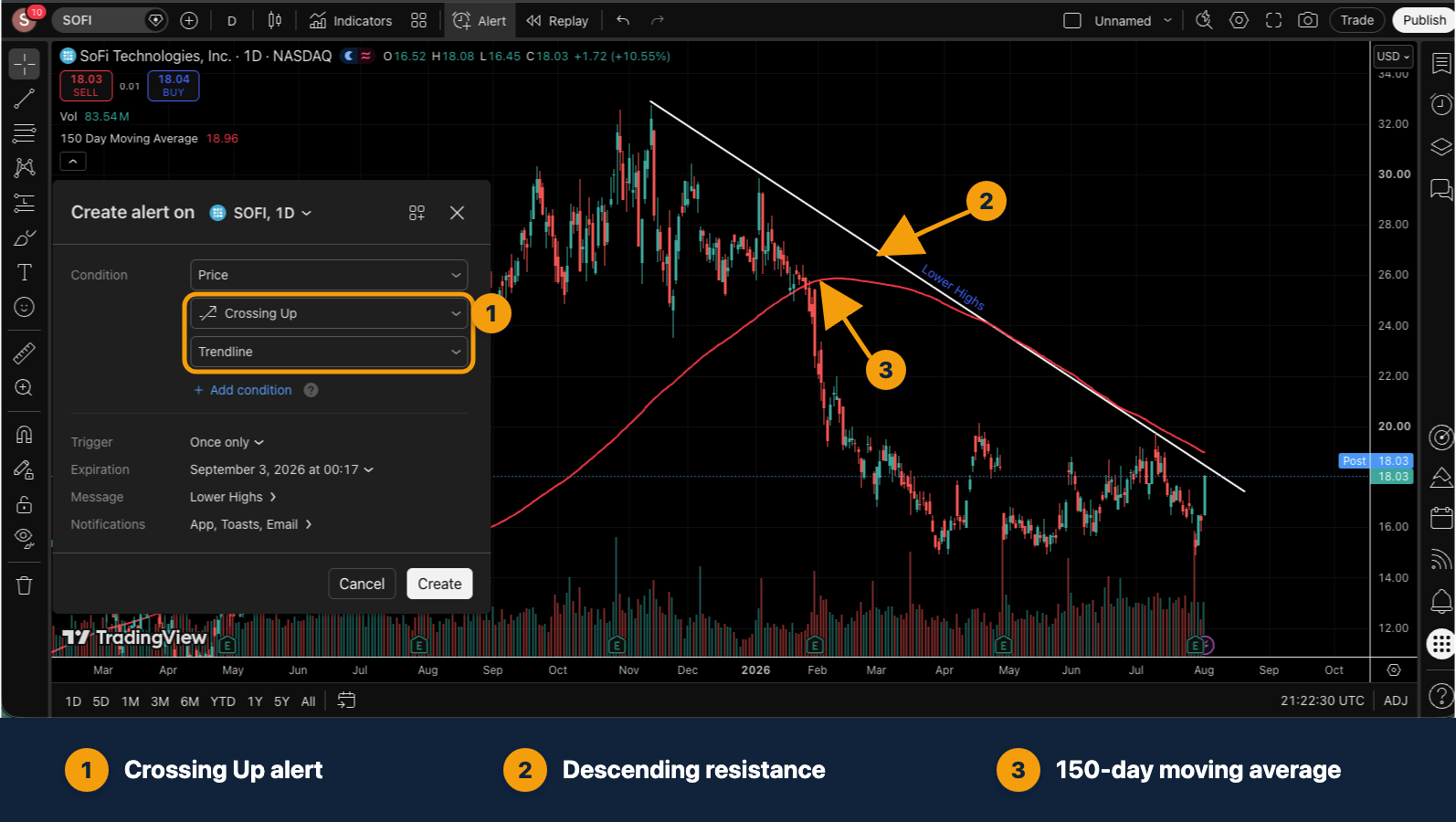
These events can reveal a potential setup at the moment it becomes relevant. However, a new high, resistance break, or moving-average cross is not automatically a good entry. Before acting, review the closing price, volume, broader market, current news, liquidity, risk level, and the rules of the strategy you are testing.
A structured alert workflow can save substantial screen time:
- Build a focused watchlist from stocks you have already analysed.
- Write down the exact condition that would justify another review.
- Create the alert with the correct symbol, timeframe, trigger, and expiration.
- When it fires, reopen the chart and check whether the full setup is still valid.
- Record the decision, including occasions when you correctly choose not to enter.
For this workflow, the Basic plan’s small alert allowance can become a real operational limit. Essential or Plus may therefore be worth comparing when you actively monitor more researched setups than Basic can hold. Our TradingView alert guide shows how to configure the condition, frequency, expiration, and notification method.
Paid TradingView Does Not Automatically Include All Real-Time Data
A TradingView subscription and an exchange data package are separate products. Some symbols can be delayed, and some official real-time exchange feeds require an additional monthly subscription. Professional data status may involve different exchange fees.
Before upgrading, check the data status of the actual markets you use. Paying for more charts does not fix a missing or delayed exchange feed.
Monthly vs Annual: Which Is Safer?
Annual billing commonly reduces the effective monthly price, but it requires a larger upfront commitment. Monthly billing costs more over a full year but makes it easier to stop if the workflow changes.
A lower-risk sequence is:
- Use Basic until you identify a real limitation.
- Write down the exact feature and minimum limit required.
- Use an available trial to test that feature in your normal workflow.
- Choose the lowest plan that solves the documented problem.
- Compare the total annual charge, renewal terms, tax, and market-data costs before paying.
Is Essential, Plus, or Premium the Best Value?
There is no universal best-value plan because the tiers solve different constraints.
- Essential is the logical first comparison for someone who wants an ad-free layout, up to five indicators, and a modest increase in alerts.
- Plus is often the more practical comparison for multi-timeframe analysis because it supports four charts per tab and much higher alert limits.
- Premium makes sense only when eight charts, deeper history, or hundreds of active alerts are operational requirements.
If you cannot name the limit that requires Premium, start lower.
Can a Paid Plan Improve Trading Results?
A paid plan can make research more efficient, but it cannot make a strategy profitable. More historical data can improve a test, more alerts can reduce screen watching, and multiple charts can make comparison easier. These are workflow benefits. They do not remove market risk, data limitations, execution costs, or behavioral mistakes.
Use TradingView Paper Trading to practise the process before connecting a real broker. Use our alert guide to build purposeful alerts instead of upgrading simply to create more notifications.
Final Verdict
Use Basic while learning and while its limits do not interrupt your actual workflow. Upgrade to Essential or Plus when you can identify a repeated chart, indicator, advertisement, or alert constraint. Consider Premium or Ultimate only when the higher limits have a clear operational purpose.
Compare TradingView Free and Paid Plans
Affiliate note: We may earn a commission from qualifying TradingView purchases made through our links, at no extra cost to you.